Online banking has transformed the way people manage money. Instead of visiting a branch, customers can transfer funds, pay bills, check balances, manage investments and make digital payments from a smartphone or computer within minutes.
Services such as mobile banking, UPI and instant electronic transfers have made financial transactions faster and more convenient than ever. But this convenience has also created new opportunities for cybercriminals.
Modern financial fraud is no longer limited to stolen cards or obvious scam emails. Criminals increasingly use phishing websites, fake customer-care calls, malicious applications, social engineering, identity theft and other techniques to trick people into authorizing transactions or revealing confidential information.
The good news is that many online banking scams can be prevented with relatively simple habits.
The key is to think about security as a layered system. A strong password alone is not enough. Your bank account, smartphone, email account, SIM card, payment applications and everyday online behavior all form part of your financial security.
Here is how to build stronger protection.
Why Online Banking Security Matters
A bank account is not protected by one password alone. Several connected services can potentially provide criminals with a path toward your financial information.
For example, your banking account may be connected to:
- Your mobile phone number
- Your email account
- UPI applications
- Debit or credit cards
- Cloud accounts
- Password managers
- Shopping and payment applications
If an attacker compromises one of these services, they may attempt to use the information to target another.
This is why online banking security requires more than simply memorizing a difficult password.
Common Online Banking Scams You Should Know
1. Phishing Emails and Fake Websites
Phishing remains one of the most common ways criminals steal login information.
You may receive an email claiming that your bank account needs verification or that your card will be blocked unless you take immediate action. The message may contain a link leading to a website that looks remarkably similar to your bank’s legitimate website.
The objective is simple: persuade you to enter your username, password, card details, PIN or OTP.
How to stay safe: Don’t click banking links received unexpectedly through email or messages. Instead, open your bank’s official application or manually enter a trusted website address. RBI guidance also advises customers to use verified banking websites and avoid suspicious links.
2. Vishing and Fake Customer-Care Calls
Vishing is phishing conducted through voice calls.
A fraudster may introduce themselves as a bank employee, police officer, payment-service representative or customer-support agent. They may claim that suspicious activity has been detected on your account and create pressure by telling you that immediate action is necessary.
The caller may then ask for an OTP, UPI PIN, card number, CVV or password.
Don’t provide these details.
A genuine bank representative should not require you to disclose confidential authentication credentials over a phone call. RBI specifically advises customers never to share passwords, PINs, OTPs or CVV information with anyone.
3. Smishing: Fraud Through SMS
Smishing is phishing through text messages.
Typical messages may claim:
- Your KYC needs updating
- Your bank account will be suspended
- Your parcel requires a payment
- You have received a refund
- Your credit card has been blocked
- You have won a prize
The message usually contains a link designed to make you act quickly.
Instead of clicking, independently contact the organization through its official website or application.
4. Malicious Apps and Banking Malware
Some fraudulent applications are designed to steal information from your device.
They may imitate banking, financial, utility or other legitimate applications. Malware can potentially capture sensitive information, monitor activity or manipulate what a user sees on their device.
Download financial applications only from official app stores and verify the publisher before installation. Avoid installing applications sent to you through unfamiliar links or messages.
Keep your operating system and applications updated because security updates frequently address known vulnerabilities.
5. SIM-Swap Fraud
Your mobile number is often connected to banking alerts and payment authentication. That makes it an attractive target.
In a SIM-swap attack, criminals attempt to convince a mobile carrier to transfer a victim’s number to another SIM. If successful, the attacker may receive calls and SMS messages intended for the victim.
To reduce the risk, pay attention to unexpected loss of mobile service. If your phone suddenly loses network connectivity without an obvious reason, contact your mobile operator promptly and check your financial accounts for suspicious activity.
How to Secure Your Online Banking Account
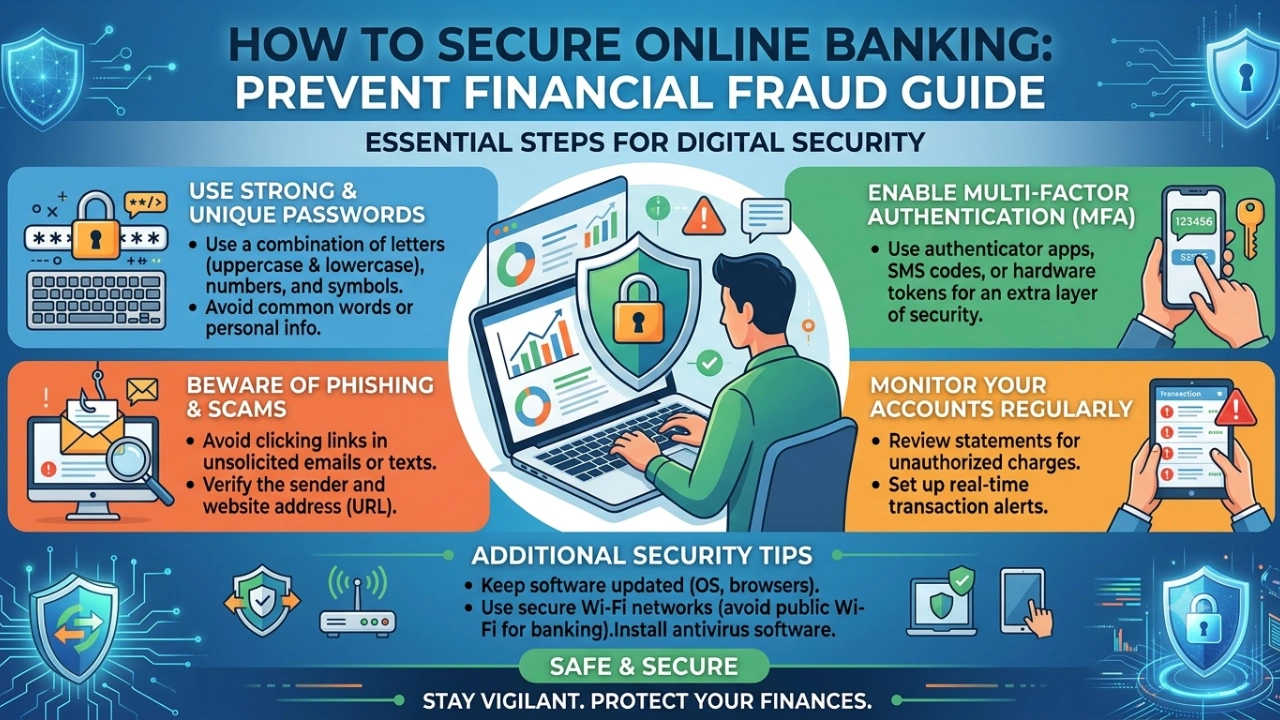
Step 1: Create a Unique, Strong Password
Never use the same password for your bank account, email and other websites.
Password reuse creates a serious problem. If credentials from another website are exposed, criminals may try the same username and password on banking services.
Use long, unique passwords for important accounts. A password manager can make this easier by generating and storing different passwords for each service.
Your banking password should never be shared with friends, relatives, colleagues or anyone claiming to be a bank representative.
Step 2: Turn On Multi-Factor Authentication
Multi-factor authentication (MFA) adds another verification layer beyond your password.
Where your financial institution offers stronger authentication options, use them. Depending on the service, this may include an authenticator application, device-based authentication, biometrics or a security key.
Remember that MFA is not a reason to trust unexpected calls or messages. A scammer may try to convince you to approve a legitimate authentication request that they initiated.
Never approve a login or transaction you did not initiate.
Step 3: Protect Your Email Account
Your email account deserves special attention because it may be used to reset passwords or receive financial alerts.
Use a unique password and enable MFA. Review recovery email addresses and phone numbers periodically.
If someone gains access to your email account, they may attempt to reset passwords for other online services.
Step 4: Keep Your Smartphone Updated
Your smartphone is effectively a financial device.
Install operating system and application updates promptly. Turn on automatic updates where appropriate, and remove applications you no longer need.
Avoid installing applications from unknown sources. On Android, be especially cautious about sideloading applications obtained outside trusted channels.
Also use a screen lock such as a strong PIN, fingerprint or facial authentication where supported.
Step 5: Be Careful With Public Wi-Fi
Public Wi-Fi networks can create additional security risks, particularly when you don’t know who operates the network.
Avoid performing sensitive banking transactions on open or unfamiliar networks. If you need to access your bank urgently, using your mobile network is generally preferable to an unknown public hotspot.
A VPN can provide additional privacy on some networks, but it should not be treated as a substitute for secure banking practices. A VPN cannot protect you from a fake banking website, phishing message or scammer who persuades you to authorize a payment.
Step 6: Check the Website Before Logging In
Look carefully at the website address.
A secure connection indicated by HTTPS is useful, but it does not automatically mean that the website belongs to your bank. Fraudulent websites can also use HTTPS.
The safest approach is to access your bank through its official application, a trusted bookmark or an address you have independently verified.
Avoid searching for your bank’s customer-care number through random advertisements or social-media posts. Fraudsters sometimes publish fake support numbers.
Step 7: Turn On Transaction Alerts
Enable SMS, email or application notifications for financial transactions.
Alerts can help you identify unauthorized activity quickly.
If you receive a transaction notification that you do not recognize, don’t ignore it. Check your account and contact your financial institution using an official channel.
RBI recommends registering your mobile number and email address with the bank so that customers can receive transaction alerts.
Step 8: Never Share OTP, PIN or UPI PIN
This is one of the most important rules of digital banking.
Your OTP, ATM PIN, UPI PIN, CVV and banking password are confidential.
Don’t share them with someone claiming to be:
- A bank employee
- A police officer
- A government official
- A customer-care representative
- A delivery agent
- A payment-app employee
Also remember an important UPI safety rule: receiving money does not require you to enter your UPI PIN. RBI warns users not to enter a PIN or OTP merely to receive money and advises caution with unknown QR codes and links.
Be Careful With QR Codes and Payment Requests
QR codes are convenient, but scammers can misuse them.
Before approving a UPI payment, check the recipient’s name and the amount displayed on your screen.
Don’t scan an unknown QR code simply because someone tells you it is necessary to receive a refund or payment.
Pause whenever a transaction feels unusual.
A few seconds of verification can prevent a costly mistake.
Set Transaction Limits When Possible
Some banking and payment services allow customers to manage transaction limits or disable certain card features when they are not needed.
Consider using appropriate limits for online transactions and temporarily disabling card features you don’t require, if your bank provides those controls.
This creates another layer of protection if your card information is exposed.
What to Do If You Suspect Financial Fraud
Speed matters when you discover an unauthorized transaction.
1. Contact Your Bank Immediately
Use the bank’s official customer-care number or banking application to report the transaction.
Ask the bank to block or restrict the affected card, account or payment facility where appropriate.
RBI advises customers to notify their bank immediately after discovering an unauthorized electronic transaction. Prompt reporting can reduce potential losses.
2. Report Cyber Financial Fraud
For people in India, the Government’s National Cyber Crime Reporting Portal provides a facility for reporting cybercrime and financial fraud. The national cybercrime helpline for financial fraud is 1930.
National Cyber Crime Reporting Portal
When reporting a case, keep relevant information ready, such as the transaction ID or UTR, transaction date, fraud amount, bank or wallet details and supporting evidence.
3. Preserve Evidence
Don’t delete suspicious messages or emails immediately.
Save:
- Transaction screenshots
- SMS alerts
- Email messages
- Phone numbers
- Website addresses
- Payment details
- Transaction IDs
- Chat conversations
- Screenshots of fraudulent applications or websites
These records may help your bank and law-enforcement authorities investigate the incident.
4. Change Compromised Credentials
If you believe your password or device has been compromised, change important passwords from a trusted device.
Prioritize your banking account, email account and other services that could be used to access financial information.
If malware is suspected, consider getting the device professionally checked before continuing sensitive financial activity.
Understanding Customer Liability
In India, reporting an unauthorized electronic transaction quickly can be important for determining customer liability.
RBI’s guidance states that in certain third-party breach situations where the customer is not at fault, reporting within three working days can result in zero customer liability. Different circumstances and reporting periods can produce different outcomes, while customer negligence—such as sharing payment credentials—can affect liability.
This is why the safest approach is simple:
Don’t wait to see what happens. Report suspicious transactions immediately.
A Simple Online Banking Security Checklist
Before using online banking, ask yourself:
- Is my banking password unique?
- Is MFA enabled where available?
- Is my phone’s operating system updated?
- Are my banking applications downloaded from trusted sources?
- Are transaction alerts enabled?
- Am I using a trusted network?
- Did I open the bank’s website through a legitimate channel?
- Am I being pressured to act urgently?
- Has anyone asked me for an OTP, PIN or UPI PIN?
- Did I independently verify the payment recipient?
If any answer makes you uncomfortable, stop the transaction and verify the situation.
Digital banking is not inherently unsafe. The biggest risks often arise when criminals manipulate users into revealing information, installing malicious software or approving transactions themselves.
The strongest defense is therefore a combination of technology and awareness.
Use unique passwords, enable additional authentication, keep devices updated, avoid suspicious links, protect your mobile number and monitor transaction alerts. Most importantly, never allow urgency or fear to override your judgment.
A genuine banking problem can be verified through an official banking channel. You don’t need to follow instructions from an unexpected caller, message or email simply because it sounds urgent.
Online banking security is not a one-time setup. It is a habit.
The few seconds you spend checking a link, recipient, phone call or payment request could save you from hours—or years—of financial and emotional trouble.