
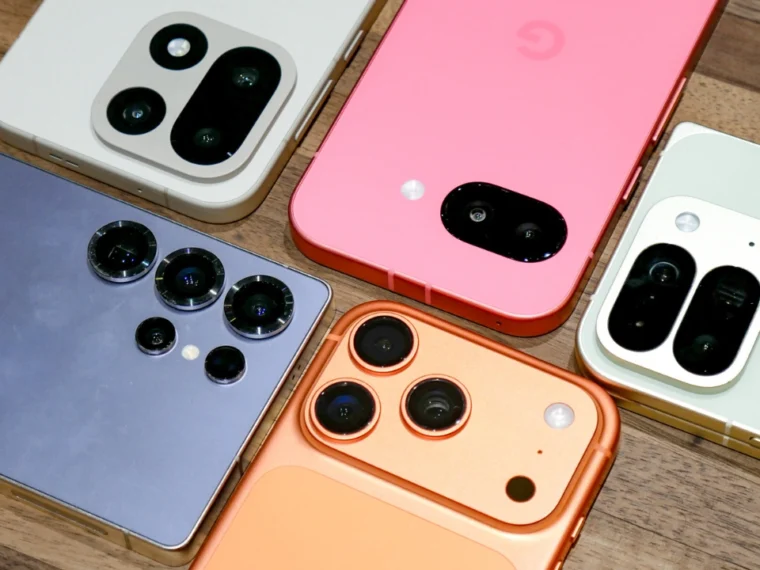
Ever picked up your phone, flipped it over, and just… noticed the camera? Most of us don’t. We unlock, scroll, click a photo, and move on with our day. But that little camera bump sitting on the left side of almost every smartphone you’ve ever owned isn’t there by accident. It’s the result of some pretty deliberate engineering, years of user research, and a surprising amount of psychology.
Let’s actually break down why this happens — and why your selfies sometimes look weirdly flipped after you save them.
It All Comes Down to How We Actually Hold Our Phones
Here’s the thing: the vast majority of people on the planet are right-handed. Phone companies know this better than anyone, and they design their devices around it.
Think about how you naturally grip your phone in portrait mode with your right hand. Your fingers tend to wrap around the right edge and curl slightly toward the back of the device to get a secure hold, especially when you’re one-handing it while walking or multitasking. Now imagine if the camera lens was sitting right there too, exactly where your fingers naturally land. You’d be blocking your own shots half the time without even realizing it, and you’d probably blame the camera quality instead of your grip.
By shifting the camera to the left side, brands keep it out of that danger zone entirely. Your fingers stay where they naturally rest during normal use, and the lens stays completely clear. It’s a small, almost invisible design choice, but it makes a real difference every single time you snap a photo without thinking twice about where your hand is.
Landscape Shooting Gets Noticeably Smoother Too
A huge amount of video content today gets shot horizontally — YouTube videos, Instagram reels in landscape, gaming clips, even movies filmed on phones. And here’s where the left-side placement pays off again.
When you rotate your phone sideways to shoot in landscape mode, that left-side camera conveniently ends up sitting in the upper corner of the frame instead of somewhere your palm might cover. That positioning gives you a noticeably steadier grip while recording, and it’s much harder to accidentally smudge the lens or block it with a stray finger while you’re holding the phone in one position and tapping on-screen controls with the other hand.
If phone makers had gone with a center or right-side placement instead, a lot of us would be fighting our own grip every time we tried to film something in landscape. This one small positioning choice quietly solves that problem before it even starts.
There’s a Serious Engineering Angle Too
Camera placement isn’t only about your grip and shooting comfort — it’s also about what’s happening inside the phone itself, where space is brutally limited. Engineers have to squeeze in a battery, a motherboard, a cooling system, multiple speakers, antennas, charging components, and increasingly massive camera hardware, all into a few millimeters of internal space.
Modern phone cameras have grown far more complex than the simple single-lens setups from a decade ago. Today’s flagship phones pack in periscope zoom lenses, ultra-wide sensors, laser autofocus modules, optical image stabilization systems, and support for 4K and even 8K video recording. All of that hardware needs real estate, and it needs to sit somewhere that doesn’t throw off the phone’s internal weight balance or interfere with heat dissipation.
The top-left corner tends to be the most efficient spot to house all of that without compromising the rest of the phone’s internal layout. It keeps things organized in a way that works for both the engineers building the device and the people actually using it every day.
Also read: Clear Signs It’s Time to Replace Your Smartphone
Why Do Your Selfies Look Flipped After You Take Them?
This one trips up a surprising number of people, and it’s worth explaining properly. You take a selfie, the preview on your screen looks totally normal, but the saved photo looks… reversed. Text on your shirt is backwards, your hair part is suddenly on the wrong side, everything feels slightly off even though it’s clearly you.
Here’s why this happens: your phone shows you a mirror-image preview while you’re framing the shot, because that’s exactly what you’re used to seeing every time you look into an actual mirror. It feels natural and familiar, so companies design the live preview to match that experience. But when the photo actually saves, many phones flip the final image back to your “true” orientation — the way other people genuinely see you in real life, rather than the mirrored version you’re used to seeing of yourself.
Neither version is technically wrong. They’re just two different ways of representing the exact same face, and most of us have simply spent more time looking at our mirrored reflection than our true one, which is why the switch feels jarring at first.
Want Your Selfies to Match the Preview? You Can Fix That
Good news here: most modern phones let you turn this behavior off entirely. Head into your Camera settings and look for an option along these lines:
- Mirror Front Camera
- Save Selfies as Previewed
- Flip Selfies
Toggle it on, and from that point forward, your selfies will save exactly the way you saw them on screen while shooting. This has quietly become a go-to setting for content creators and influencers who want visual consistency across their photos and posts, especially when text or logos are involved in the shot.
Why Do So Many Brands Copy This Same Layout?
It’s not really copying in the way people assume — it’s more like convergence. Every major smartphone company runs extensive ergonomic testing before a phone ever ships to the public. They study how people hold their devices, how they shoot photos and video, how they grip the phone while gaming, and how fingers naturally move across the screen during everyday use.
When one particular placement keeps winning across all of that testing, year after year, other brands independently land on the same answer. That’s the real reason why, despite wildly different phone designs, price points, and target markets, the left-side camera placement has quietly stuck around across the industry for years.
Camera Design Has Come a Long Way
Older phones had one basic camera, usually planted dead center on the back. As phone cameras evolved into multi-lens systems with much bigger sensors, companies started experimenting with all kinds of layouts — vertical stacks, square “camera islands,” circular modules, even diagonal arrangements. Chances are you’ve owned phones with several of these designs without ever really noticing the shift.
But through all of that experimentation and change, the left-side position has remained one of the most consistently practical choices for both usability and internal engineering, which is exactly why even today’s premium flagship phones still lean on it.
So the next time you glance at your phone’s camera setup, know that it’s not a random design decision at all — it’s the product of years of ergonomic research, hardware engineering trade-offs, and a genuine, deliberate effort to make everyday photography feel effortless.
Ever wondered why your phone’s camera sits on the left side, not the right? Turns out it’s all about how you actually hold your phone 📱
Plus — why your selfies flip after saving. Full breakdown here https://t.co/LuhhAbA5Ma#TechFacts #SmartphoneDesign— cityviti (@cityviti1) September 9, 2026